How to add week numbers to a calendar
Week numbers turn a month grid into a planning tool — project timelines, pregnancy weeks, school terms. The generator numbers weeks the ISO way (week 1 contains the first Thursday of January), which matches how most of Europe and business plans.
How to add week numbers to a calendar sections
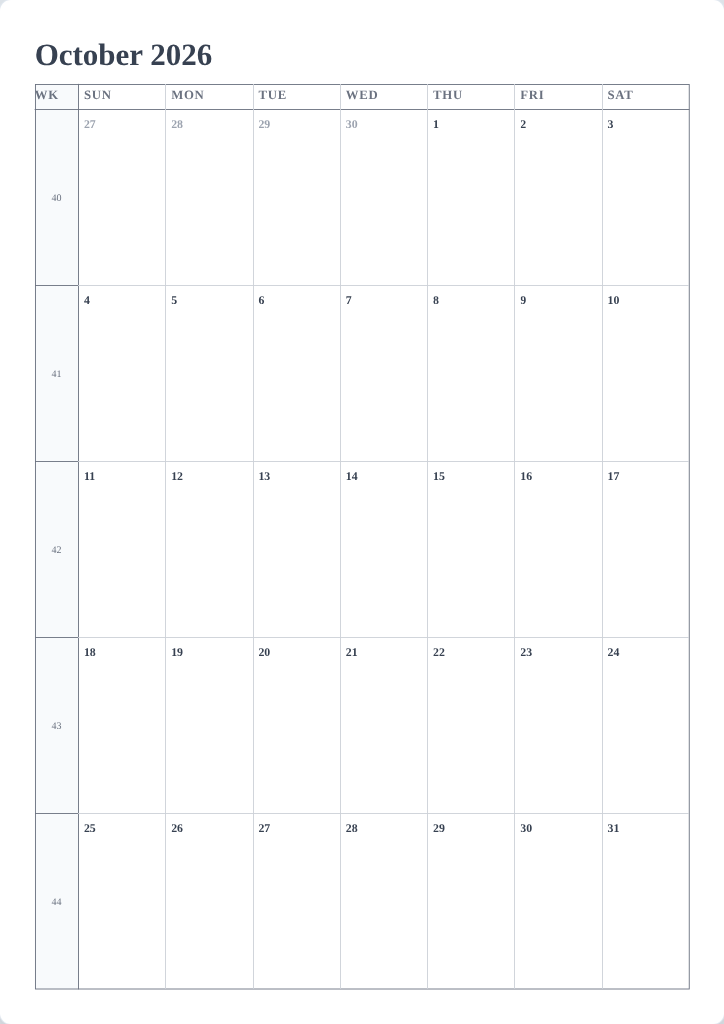
Turn week numbers on
- Open the Layout tab.
- Tick Show week numbers.
- The preview updates at once:
- Monthly — a slim Week column appears on the left of the grid.
- Multi-month and Yearly — every month block gets its week numbers.
- Weekly — the week number appears with the week's title ("Week 42").
Make them easy to scan
- Set Week starts on to Monday so weeks align with ISO numbering — the standard pairing.
- The week-number column has a fixed light gray fill so it never reads as a day column; you cannot recolor it, but every design leaves it subtle.
- Week-number text follows the Frame content style, so its font and size change together with the weekday labels in the style editor.
Tips
- Printing for an international office? Week numbers plus Monday start is the combination most people expect.
- On Yearly, week numbers turn the page into a genuine annual planner — try it with the Month grid layout set to Consistent 6 rows.
Mini-FAQ
- Which week numbering is used?
- ISO 8601 — weeks start Monday and week 1 is the week of the first January Thursday.