How to change the colors of your calendar
Every color on the page is yours to change. The style editor groups colors by what they color — the heading, the calendar's supporting text, the date numbers, the borders and the accent — and each color comes with an Intensity slider for fine control.
How to change the colors of your calendar sections

How colors are organized
Open the Templates tab and press Edit template. Colors live in three tabs:
- Heading content tab — the Heading group colors the page title ("October 2026"). The Accent color draws the "Today" label and the day names on weekly and daily calendars.
- Frame tab — the Frame content group colors the weekday labels, week numbers and notes text. The Frame border group's Border color sets the outer frame.
- Dates tab — the Date content group colors the date numbers, and its Background fills every date cell. The Date border group's Border color sets the inner grid lines, and Adjacent months colors the faded days from neighboring months.
Change a color
- Press Edit template on the design you use.
- Open the tab that owns the part you want to recolor (see above).
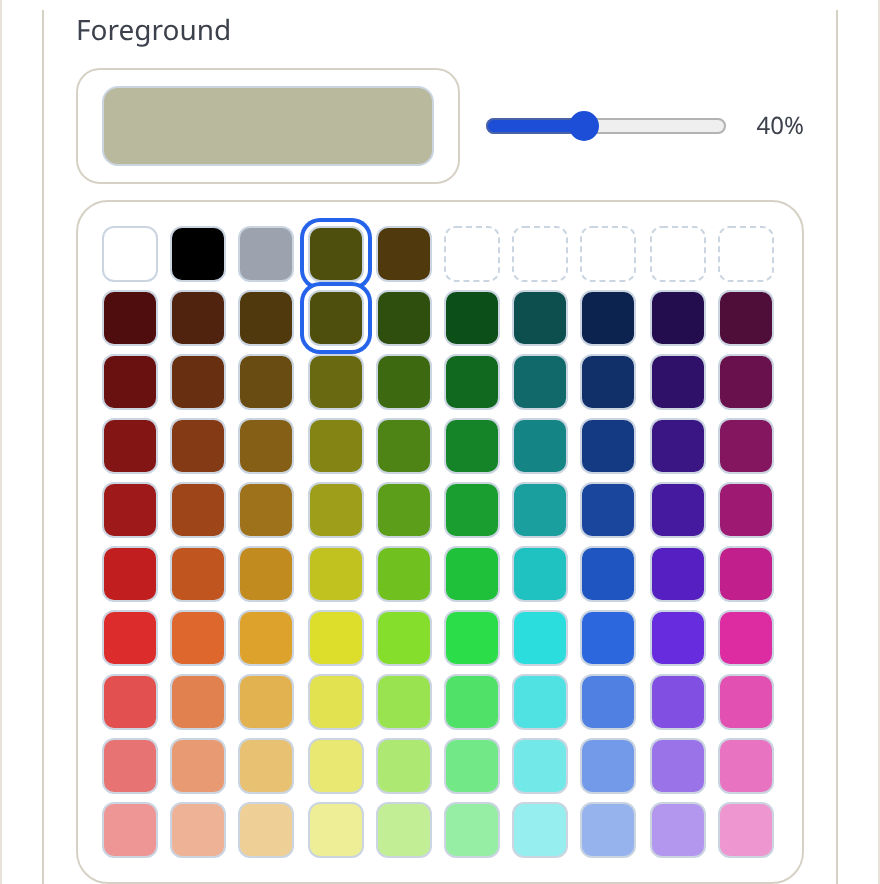
- Click the color field — for example Foreground. A palette opens: fixed swatches (white, black, gray), your seven recent colors, and a grid of generated hues and shades.
- Click a swatch. The preview updates instantly.
- Drag the Intensity slider (0–100%) to soften or strengthen it. Intensity blends the color toward the paper, so 40% gray-blue reads as a pale tint.
The white trick
Setting a Background to white switches the fill off completely — white means "no background". Use a real tint (say, a light gray-blue) when you want a visible band behind the title or the weekday row.
Tips
- Two colors that always work: a near-black ink for text, one accent used sparingly.
- For border colors, the intensity slider is not offered — borders get their color straight, and their visual weight comes from Line weight instead.
- Printing in black and white? Preview your palette by squinting: anything that turns to mud will print as mud.
Mini-FAQ
- Can I color one specific day, like a birthday?
- Not yet. Fills apply to whole roles — all date cells, or weekend columns on designs that have them — rather than single dates.